11 November 2017

I really wanted to like this TV

Toshiba 32L310U18 32-inch LED Television


Toshiba 32L310U18 32-inch LED TelevisionWhen the family spent a few days in temporary lodging not long ago, we found ourselves TV-less. Not in the mood to miss the big game (much less the latest episode of Jeopardy!), we quickly scanned the offerings at a nearby BestBuy. That’s where we found the Toshiba 32L310U18; a small, 32-inch model television (LED, 720p) and brought it "home," along with a low-end amplified antenna for grabbing over-the-air broadcasts.

05 February 2017

Another Reason I Won't Use Comcast

There have been plenty of news reports about Comcast over the years, such as the time the company's so-called customer service kept badgering a customer who was trying to disconnect service. Well, as of late last year (2016), I think the company still has problems. Here's why...

In the last week of December, my wife -- that grandmotherly silver-haired fox -- was walking the house's adorable yellow lab in the 6200 block of Tennison Drive (ZIP 46236) when she came upon a tablet lying in someone's front yard. She looked around but there was no one in sight. Feeling that protecting the valuable electronics from the elements, accidents, or light-fingered pedestrians was the best option, she tucked it in a pocket and carried it on the rest of the walk.

11 November 2016

An Ode to Incomprehensible Instructions

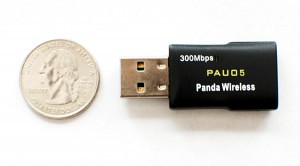
I bought a new USB wireless adapter once upon a time. Don’t laugh, I'm not a complete Luddite: the desktop computer didn’t have an internal radio and the house wasn't wired for Ethernet, so a fifteen-dollar USB plugin fulfilled a need. Whatever the case, it’s a compact device that is compatible with all kinds of operating systems and also supports all the common wireless protocols. Like darned near everything in the world these days, it was made in China; sold by a company called Panda. I have no complaints: it worked as advertised and it was (reasonably) easy to install. It was a lot faster than the old one it replaces, too.

     That installation part is why I’m here, though. The adapter is plug-and-play with Windows 10, but I installed it on a Windows 7 computer. That meant I had to use the installation guide. It’s a good thing I worked six years for a company with an office in Beijing, because I can now read the Mandarin-English mashup language people call “Chinglish.” If I couldn't, I might not have been able to finish the installation, or at least I'd have been pretty puzzled. Here's are some samples of those instructions (transcribed from the user’s manual):
"Once the wireless USB adapter be plugged into an USB port, the flowing message will appear on screen."

"Click the ‘Install’ to confirm the installation, there shows the installation progress."


I worked for several years at a software company whose Beijing-based programmers embedded messages like “Exception Happens” in their code, so wording like that doesn't bother me much: you might say I’m fairly fluent in the language. Not everyone is, though, and even I have difficulty puzzling through some of the more convoluted constructions. Years ago, I bought a bicycle trainer manufactured by Minoura. I still remember (with reluctant admiration) the convoluted assembly instructions, which you can find in an online version of the manual. I always thought it looked as though it had been translated from the original Mandarin to English using Google Translate, with a brief stopover in a third language – Arabic, maybe. Here’s what I mean:
"We suggest you do not need to move the left side coupling away so much. It should be fine to move by the center of its length, but it needs to be adjusted depends on the hub width."
I have to say that even my level of fluency failed there…

We’ve all seen examples of instructions that read like those. They can be quite frustrating. They may leave a bad taste in our mouths for the product, the maker, even the country. Most of all, they look unprofessional and give a buyer the impression that the manufacturer doesn’t care. That may be right, but I doubt any manufacturer wants buyers to realize that inconvenient truth.

Don’t get me wrong: I am not one of the people who demands that everyone speak English. I have immense respect for anyone who is even reasonably fluent in a second language, because heaven knows I can barely find a bathroom or order a beer in any other language. OK, to be honest, I’ve made it a practice to learn “beer” and “bathroom” in the local language. But how much trouble can it be to find a native speaker who can read through your customer documents to clean up language errors like that?

Come to think of it, I’m available. If you have brochures, instructions, technical documents or a user’s manual in Chinglish, Spanglish or some other mashup language, give me a call: I may be able to edit those incomprehensible instructions for you…


copyright © 2016 scmrak

17 June 2015

This Light’s Easy to Install, but it Doesn’t Last

Cooper MS188W Motion-Detecting Halogen Security Light 


I’m not particularly paranoid, but it’s still something comforting to see a motion-detector light mounted at our garage door. For one, having one is easier than scrabbling for keys and keyholes in the dark and for another, the kids like to leave toys just outside the back door for me to trip over..

Soon after we got settled into our last house, we put up a security light with a motion detector in just that spot. At one of the BigBox stores, we found a 300-watt halogen fixture; the Cooper MS188W Halogen Motion-Detecting Light (available in white or bronze).

02 March 2015

Roku Streaming Stick or Google Chromecast: Why not Both?

Roku 3500R Streaming Stick


If you consider cable television’s combination of poor customer service, high prices and forced channel bundling; it’s no wonder many former cable customers have “cut the cord.” I did: tired after decades of paying a gigantic monthly bill for a channel bundle including more than 150 channels I didn’t watch, I bid AT&T’s Uverse farewell. I increased my internet speed, invested in antennas to capture over-the-air HD broadcasts and bought a pair of Google’s Chromecast sticks and two different Roku Streaming Players. 

Description and Installation of a Roku Streaming Stick

We installed a Roku 2 and a Chromecast on the television in our family room, a Chromecast in the master bedroom, and put a Roku 3500R Streaming Stick on the little TV in our exercise room. Roku’s stick can connect to any TV that has an HDMI port, which is different from a Roku 2 that can also connect with component inputs. It plugs directly into a female HDMI port on the television, drawing power either from the TV’s USB port or from a wall AC adapter.

09 February 2015

Share that Sound with a Friend with a Monster iSPlitter

Monster iSplitter 1000 Y-Splitter


You’ve certainly seen advertisements of a couple of teenage girls sharing a single set of earbuds: head-to-head, each with a single bud in one ear, big grins on both faces. Yeah, right: that’s a commercial. In reality, that doesn’t work – you need two sets of earbuds. If you want decent sound, you probably need two sets of real earphones. It’s a no-brainer.


So how do you send a single feed from a tablet, MP3 player, smartphone, or other device to two sets of ears? Simple: a Monster iSplitter 1000. The lower-case i notwithstanding, it’s actually a pretty useful little device. I say “little” because it’s quite small, about the size of one of those iPod shuffles: 32mm x 47mm and 11mm thick, with a 10.5-cm “tail” that terminates in a standard 3.5mm jack. For you metricphobes, that means it’s 1-1/4 x 1-7/8 inches and 1/3” thick, with a 4-inch tail. It weighs about an ounce, if you care.

The iSplitter has two standard 3.5mm output jacks, which are controlled by individual volume-control sliders. The sliders go all the way from full mute to passing full volume of the input signal. This capability is handy in case two people are listening on headphones with different sensitivities or simply want to listen at different volumes.


11 January 2015

What to Do When a Surveillance Camera is a Waste of Money

Q-See QN6401X EasyView WiFi/IP Camera


You know us dog people: we’re nuts about our mutts. So like many of the fraternity, we've often wondered what it is the pups do when we’re not watching them. It would be interesting to know just which one dragged that pillow into the family room or whose paws made those drag marks in the carpet. That’s why we bought a cheap-o surveillance camera – not because we wanted to video the home invaders, because we wanted to spy on the dogs.

The operative word is “cheap-o” – that’s why we ended up with a Q-See QN6401X EasyView Wireless/IP Camera, which set us back the sum of (about) a seventy bucks. I am here to tell you, it was seventy bucks wasted.