11 January 2022

Life with a Roku Streaming Stick 4K

Roku Streaming Stick 4K (2021)


We’ll get this out of the way, right up front: the reason I bought a new version of the Roku Streaming Stick 4k (2021 version) is that my old one would no longer support streaming Amazon Video. Don’t ask me why… We’ve had a Roku in the mix since about 2014, first a Roku 2 (replaced last year for the same [suspicious] reason) and later a earlier-generation Roku Streaming Stick (3500R). The two go along with a trio of Google Chromecasts that cover three of our four televisions; one of which travels with us when we rent from VRBO or Air B&B.

I bought this model from Amazon, where the price has increased by something like 56% since I placed the order. Lucky me… except that I had to send the first one back, and the replacement got lost in transit. Try talking someone at Amazon “support” into sending you a new one instead of issuing a refund so that you can buy another at the new, “improved” price. Sheesh!

Whatever the case, I got the replacement and lo and behold, it had exactly the same “problem” as the original. It took some sleuthing, but I finally found out what was up. More on that later. The stick plugs directly into an HDMI port on the Television and is powered by a cord with a micro-USB on one end and a full-sized USB on the other. You can either plug it into a USB port on the television (not all TVs will power the unit) or into the supplied wall adapter. The cord has a fat plastic section that Roku (somewhere) says is a WiFi booster. I didn’t need it, but it’s probably nice to have.

The stick itself is about 20% longer than the model it replaced (84mm vs. 69mm), making it too large to fit into one of the HDMI ports. Lots of people complain about that, enough that Roku will send you a free flexible extender if you can find the order form. They are, of course, backordered… for three months.
Setup is typical Roku; plug it in and follow the on-screen instructions; you’ll have to enter a code on the Roku website as well as an email address and password. Just like every smartphone, Roku then automatically installs about seventy channels of bloatware, including such clinkers as the golf channel. OK, maybe some people like to watch golf…

On the GOOD side, the streaming stick is wicked fast compared to my old version, which was about five years old. The remote (included, as are 2 AAA batteries) has been upgraded to include volume controls and a mute button on the right-hand side and a voice control button where the OK button used to be. There’s also a power button that can be used to control the television. That’s in addition to the usual array of right-left-up-down-back-home-pause. Four pre-programmed buttons take you to Netflix, Hulu, Disney+ (pbbbbt) and Apple-tv (double-pbbbbbbt).  Still can’t program them to your choice of streaming services.

On the BAD side, there’s damned near no documentation for this thing, so it was only by accident that I learned that the unit has a power-save mode that is, for unknown reasons, set to ON by default. Since it’s not documented anywhere, you won’t know that this is the reason the unit has to be reset every time you want to use it. Can you say, “Pain in the ass?”

So here are my two tips for living with this new version of the Roku Streaming Stick. First, find the power-save function (it’s in system settings) and turn it off. Otherwise you’ll be cursing Roku for the duration. Second, if you power the stick with the TV’s USB port, DO NOT set the power button on the Roku remote to control the television power. If you do, the television won’t come on until the Roku boots up ten seconds, maybe) and then you hit the power button. Again, PitA.

Once I figured out those two caveats, I’m perfectly happy with my Roku Streaming Stick 4K, and will most likely stay that way until the company makes a deal with Netflix or Hulu to stop supporting their streaming, thereby forcing me to buy a couple more Rokus. Oh, well, at least they’re faster than the old ones…

Summary

PLUS: wicked fast, good streaming experience, upgraded remote function, interfaces with Alexa, Siri, or Hey! Google
MINUS: poor documentation of "hidden" features, bloatware channels
WHAT THEY'RE SAYING: Cut the cord and get a Roku. 
copyright © 2022-2023 scmrak

06 May 2021

Decent Enough Earbuds, I Guess

SoundPEATS TrueFree+ Wireless Earbuds


SoundPEATS TrueFree+
I'll be honest: I am not one of those people who spends his entire life tethered to his phone. In fact, I get maybe two calls a day, most of them spam; about the same for texts. So when I decided to get some wireless earbuds, I wasn't interested in forking over a pair of Benjamins just to have some nifty white things that Siri has kissed. No, I picked up a pair that cost a quarter of that: SoundPEATS TrueFree+ Wireless Earbuds. In case you're like me and don't care whether people know you have a "cool" smartphone, here's what I think of them.

I wanted some to wear while riding my spin bike in the basement and occasionally while walking. For the most part, they remain securely in my ears, but I would NOT recommend wearing them while running: you'd spend half your life looking for them after they fell out.

15 September 2018

A Visitor From Another Planet, or Just a Helpful Tool?

Homedics PA-200H Programmable Percussion Massager


    "Take me to your leader," a scratchy whisper interrupted my nap.

"Whaa?" I mumbled to my dream.

"PA phone home?" came the querulous reply.

"Whaa?" I repeated. I'm not the sharpest knife in the drawer when three-quarters asleep.

"Awake, foolish earthling!"

OK, that got my attention. But when I did awaken, there was no evil, ray-gun toting alien at my bedside; just a Homedics PA-200H massager that I'd left lying on the night stand. Oh, sure, with that gray triangular "head," the long skinny "neck," and those pupil-less black "eyes" at the corners of its "face," the PA-200H could easily be mistaken for an escapee from a Whitley Streiber novel as brought to life by Industrial Light and Magic. But on second glance, there are no long, bony fingers and no stereotypical lipless mouth; just an array of teeth, err, buttons and a long, dangling cord. So, my bedroom safe from alien invasion, at least for the moment, I went back to sleep.

Besides, my lower back was feeling so much better!

Features 


The PA-200H may look like something out of an episode of "The X-Files," but it sure doesn't act like a marauding interstellar visitor. It's well behaved; even well trained. It's an impact massager, with twin heads (on the opposite side from its face) that pound your sore spots like tiny fists, only lots faster. You can use any of three black rubber heads of varying hardness to give yourself a good thumping, or use plastic heads that can be heated. Those nice alien wranglers at Homedics taught the little guy some additional tricks, too, including:

Five Intensities: when used with the manual massager setting these simply change the speed (although there seems to be very little difference between numbers 4 and 5).

Three Programs: in which the thumping frequency sweeps from minimum intensity to maximum and back; the different programs have different rates of change and stay at the extremes for different lengths of time.

Three Intervals: allows you to speed up the whole cycle on any of those programs.

Heat: either on or off, and usable only with the supplied heatable pads. It appears to raise the temperature to about 10-15 degrees (F) above body heat. Soothing...

Auto Width Adjustment: hold down a button and the heads slowly move apart, keep depressing it and they come back together again. Maximum spread is about 4 inches, minimum is about 3 inches; the gap between heads ranges from about 1-3/4 inch down to 3/4 inch.

Usage 


The PA-200H is hand-held and corded with a 12-foot line, there's a Velcro loop on the line to help stow the cord neatly. All controls except the width adjustment are on the face, where they can be operated with a thumb or the other hand. These controls are the soft-touch type often seen on calculators and cash registers, which helps keep dust and dirt out of the works. The auto-width adjustment button is on the other side, adjacent to the vibrating heads.

Recommendations 


Extra contact pads screw on and off fairly easily, though they don't look all that well made to me. The threads for screwing them on do not go all the way around, and it's easy to accidentally cross-thread them. There's also no way to store the accessory heads that aren't in use except for the crumbly styrofoam block from the original packaging.

The unit weighs about six to eight pounds, most of which is concentrated out at the business end. It's awkward to use if you're trying to support its weight (e.g., using it on your hamstrings while sitting). The massager works best when held horizontal so that its entire weight is on the vibrating pads, so why not get someone else to do your back for you!

Since it's apparently sturdy and possessed of plenty of features, we're happy to have our PA-200H hiding in that little nest in the master bath. As of this date, it doesn't seem to have made contact with the mother ship, although there are some suspicious "signs" shaved into the back yard grass. I'm keeping an eye on the little guy, just in case!

Summary


PLUS: versatile thumper, heated
MINUS: awkward weight distribution, "face" may frighten small children
WHAT THEY'RE SAYING: Though it might look like a Close Encounter of the Third Kind, the Homedics PA-200H is actually a handy device for soothing aching muscles.
copyright © 2018-2021 scmrak

12 August 2018

Another Great Mouse from Logitech

Logitech M325 Wireless Optical Mouse


logitech M325 mouse with cartoon design
All good things must come to an end. Considering the amount of abuse my Logitech V450 Nano wireless mouse suffered week in and week out, it’s not surprising that it eventually stopped working. On the other hand, it did last more than 4½ years – longer than a lot of laptops these days. They were not easy years, either, entailing heavy work with precision 3D modeling software and also an owner who regularly eats lunch at his desk. Messily.

So when it did come time to replace that V450, I didn’t bother looking at Kensington or Microsoft or any of the others: I headed straight for Logitech’s catalog to see what had replaced the V450. The answer is a Logitech M325 Wireless Mouse, and it’s (pretty much) just like my old friend.

Here are some basic specs for the M325:

The mouse operates on two AA batteries; not included. Logitech claims “up to” 18 months' battery life, but we all know that’s just a guess. On the other hand, I only remember changing the V450 batteries a time or two, so more than a year sounds reasonable. It operates under (almost) any flavor or Windows or iOs, as well as Chrome and Linux.You’ll need a USB 2.0 or 3.0 port for the receiver (in case you don’t know, a USB 3.0 port [usually] has a blue plastic insert and a 2.0 has black).The body's about 3¾” x 2¼” x 1½”, slightly smaller than my old V450. It’s ergonomically shaped to fit the hand with a rubber grip notched on both sides for the thumb, and can be used either right- or left-handed. Logitech calls the scrolling "micro-precise," and I have no argument there. The 2.4GHz wireless signal is highly reliable: I’ve never experienced a dropout or delay, even from across the room.The eensy-beansy nano receiver is called a “unifying receiver” because you can run as many as six USB devices on a single receiver… assuming they’re Logitech devices, I think.

Like its little predecessor, the M325 is a two-button mouse with a scroll wheel that can be programmed to act as a third button (for Linux fans, among others). For everyone else, the wheel operates as a forward/backward switch for web browsers; just tilt the wheel to the right or left, respectively. You can download Logitech drivers to enable an extended set of mouse features, but I prefer to use it as a standard “dumb” mouse with the Windows default mouse driver. If you want to run multiple devices on the unifying receiver, you also have to download the unifying software. Haven’t tried it…

That receiver is one of Logitech’s Nano receivers, so called because it’s a tiny (about ½” x ¼” x ¼”) chunk of plastic sitting on a USB plug.  It’s so small I never bother to unplug it, even when stowing the laptop for travel – it sticks out perhaps a quarter of an inch. If I do you want to disconnect and store it, the receiver tucks into a dedicated slot in the battery compartment, which also turns the mouse off. You could also leave it plugged in and turn the mouse off with its bottom-mounted switch. There’s a tiny green LED on the top to show the power’s on, which turns red when the battery’s low – aat which time the mouse seems to have another week or two of battery life.

Special programming features: If you download SetPoint, the M525 will end up with additional functions. By default, the wheel’s programmed to scroll the current window right-left with a wheel “tilt.” If you press and hold the wheel, you get software zoom to enlarge/reduce the current window. Tilt and press functions can be re-assigned to several other actions, like volume control for yout speakers.

Life with a Logitech M325:


Installation is easy, since it's plug-n-play. My laptop runs Windows 7 64-bit,, and the mouse worked immediately upon installation.
Download: The download software is massive, which is the  reason I didn’t bother with it – I’ve used it on other machines and don’t find that it adds that much to my experience. I have no need for the unifying software, so ditto on the no-download.
Physical stuff: The receiver only projects about 0.25" out from the USB port so you really can plug it in and forget (though maybe not so much if it’s on the side that rests on the bottom of your laptop bag).
Range: It's a minimum of ten or twelve feet from the receiver, at least with fresh batteries. I always like that for presentations, because I’m a bit of a roamer.
Surface Sensitivity: It works fine on a plain countertop, rubber mousepad, magazine surface, newspaper, cloth, and wooden desk without any tracking problems. Like other mice (mouses?) it's pretty useless on shiny or monochrome surfaces.
Portability: Though decidedly compact, it’s also pretty dense. It’s probably worth the extra ounce, though.
Buttons: Some aftermarket mice have extra programmable buttons under the thumb and ring finger for additional controls; if you're used to them, you'll not find them here. If you're not, you probably won't care. I find that the mousewheel is super-sensitive, allowing me to scroll line by line instead of the noticeable jump of some cruder mice.

Is it really Ergonomic? Well, that might depends on your tastes: the M325 is kinda chunky, but it’s still a little small for large hands. If portability isn’t your driving need, a larger mouse might fit your hand somewhat better.
Overall: A nice little mouse with few shortcomings. Logitech sells sexier mice, but they cost more than this one’s $30 price tag . I’d recommend the M325 for medium to heavy use, though not for cursor-intensive pastimes like CAD or gaming; and I especially recommend it for travelling, where its small size and Nano Receiver will be a blessing. Oh – and replacement receivers are available from Logitech, so you can literally forget the receiver as well!

Summary


PLUS: tiny and tough even while it's sensitive
MINUS: some of the software downloads are a little "much"
WHAT THEY'RE SAYING: I liked my last couple of Logitech mice so much that when the latest one died I didn't bother to look at anything but the Logitech M325 Wireless Mouse.
    

copyright © 2018 scmrak

04 March 2018

A Complete Waste of $1300

NordicTrack Elite 13.1 Elliptical


NordicTrack Elite 13.1
After we wore out a cheap elliptical machine a couple of years ago, we dithered for a while about buying a new one. Having survived a frozen winter or two when we couldn’t get outside to exercise, we broke down and went looking. Sadly, the only consumer-grade ellipticals we could lay hands on we found at Sears – Dick’s sells the Sole brand, but has none on display – so we picked out a NordicTrack Elite 13.1 Elliptical (their model 24055.0). To be frank, it’s the worst $1300 we ever spent.

04 January 2018

White Noise Without the Fan

Marpac Dohm-DS Sound Machine


Marpac Dohm Sound Machine
Because she's had a case of chronic tinnitus for several years, the woman of the house often finds it difficult to sleep without a low-to-medium level of background “white noise” in the room. Years ago, we tried some of those “sound machines” that have settings that are supposed to mimic waves or rain, but they seemed intrusive and the variations in pitch and volume seemed to make it harder to get to sleep, not easier. For years, she’s used a fan on a low setting. That’s no big deal in summer or during what Houston calls “winter,” but when the Midwestern temperatures drop below 0°F you don’t want a fan running in the bedroom at night!

11 November 2017

I really wanted to like this TV

Toshiba 32L310U18 32-inch LED Television


Toshiba 32L310U18 32-inch LED TelevisionWhen the family spent a few days in temporary lodging not long ago, we found ourselves TV-less. Not in the mood to miss the big game (much less the latest episode of Jeopardy!), we quickly scanned the offerings at a nearby BestBuy. That’s where we found the Toshiba 32L310U18; a small, 32-inch model television (LED, 720p) and brought it "home," along with a low-end amplified antenna for grabbing over-the-air broadcasts.

05 February 2017

Another Reason I Won't Use Comcast

There have been plenty of news reports about Comcast over the years, such as the time the company's so-called customer service kept badgering a customer who was trying to disconnect service. Well, as of late last year (2016), I think the company still has problems. Here's why...

In the last week of December, my wife -- that grandmotherly silver-haired fox -- was walking the house's adorable yellow lab in the 6200 block of Tennison Drive (ZIP 46236) when she came upon a tablet lying in someone's front yard. She looked around but there was no one in sight. Feeling that protecting the valuable electronics from the elements, accidents, or light-fingered pedestrians was the best option, she tucked it in a pocket and carried it on the rest of the walk.

11 November 2016

An Ode to Incomprehensible Instructions

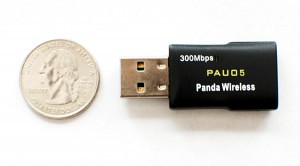
I bought a new USB wireless adapter once upon a time. Don’t laugh, I'm not a complete Luddite: the desktop computer didn’t have an internal radio and the house wasn't wired for Ethernet, so a fifteen-dollar USB plugin fulfilled a need. Whatever the case, it’s a compact device that is compatible with all kinds of operating systems and also supports all the common wireless protocols. Like darned near everything in the world these days, it was made in China; sold by a company called Panda. I have no complaints: it worked as advertised and it was (reasonably) easy to install. It was a lot faster than the old one it replaces, too.

     That installation part is why I’m here, though. The adapter is plug-and-play with Windows 10, but I installed it on a Windows 7 computer. That meant I had to use the installation guide. It’s a good thing I worked six years for a company with an office in Beijing, because I can now read the Mandarin-English mashup language people call “Chinglish.” If I couldn't, I might not have been able to finish the installation, or at least I'd have been pretty puzzled. Here's are some samples of those instructions (transcribed from the user’s manual):
"Once the wireless USB adapter be plugged into an USB port, the flowing message will appear on screen."

"Click the ‘Install’ to confirm the installation, there shows the installation progress."


I worked for several years at a software company whose Beijing-based programmers embedded messages like “Exception Happens” in their code, so wording like that doesn't bother me much: you might say I’m fairly fluent in the language. Not everyone is, though, and even I have difficulty puzzling through some of the more convoluted constructions. Years ago, I bought a bicycle trainer manufactured by Minoura. I still remember (with reluctant admiration) the convoluted assembly instructions, which you can find in an online version of the manual. I always thought it looked as though it had been translated from the original Mandarin to English using Google Translate, with a brief stopover in a third language – Arabic, maybe. Here’s what I mean:
"We suggest you do not need to move the left side coupling away so much. It should be fine to move by the center of its length, but it needs to be adjusted depends on the hub width."
I have to say that even my level of fluency failed there…

We’ve all seen examples of instructions that read like those. They can be quite frustrating. They may leave a bad taste in our mouths for the product, the maker, even the country. Most of all, they look unprofessional and give a buyer the impression that the manufacturer doesn’t care. That may be right, but I doubt any manufacturer wants buyers to realize that inconvenient truth.

Don’t get me wrong: I am not one of the people who demands that everyone speak English. I have immense respect for anyone who is even reasonably fluent in a second language, because heaven knows I can barely find a bathroom or order a beer in any other language. OK, to be honest, I’ve made it a practice to learn “beer” and “bathroom” in the local language. But how much trouble can it be to find a native speaker who can read through your customer documents to clean up language errors like that?

Come to think of it, I’m available. If you have brochures, instructions, technical documents or a user’s manual in Chinglish, Spanglish or some other mashup language, give me a call: I may be able to edit those incomprehensible instructions for you…


copyright © 2016 scmrak

17 June 2015

This Light’s Easy to Install, but it Doesn’t Last

Cooper MS188W Motion-Detecting Halogen Security Light 


I’m not particularly paranoid, but it’s still something comforting to see a motion-detector light mounted at our garage door. For one, having one is easier than scrabbling for keys and keyholes in the dark and for another, the kids like to leave toys just outside the back door for me to trip over..

Soon after we got settled into our last house, we put up a security light with a motion detector in just that spot. At one of the BigBox stores, we found a 300-watt halogen fixture; the Cooper MS188W Halogen Motion-Detecting Light (available in white or bronze).

02 March 2015

Roku Streaming Stick or Google Chromecast: Why not Both?

Roku 3500R Streaming Stick


If you consider cable television’s combination of poor customer service, high prices and forced channel bundling; it’s no wonder many former cable customers have “cut the cord.” I did: tired after decades of paying a gigantic monthly bill for a channel bundle including more than 150 channels I didn’t watch, I bid AT&T’s Uverse farewell. I increased my internet speed, invested in antennas to capture over-the-air HD broadcasts and bought a pair of Google’s Chromecast sticks and two different Roku Streaming Players. 

Description and Installation of a Roku Streaming Stick

We installed a Roku 2 and a Chromecast on the television in our family room, a Chromecast in the master bedroom, and put a Roku 3500R Streaming Stick on the little TV in our exercise room. Roku’s stick can connect to any TV that has an HDMI port, which is different from a Roku 2 that can also connect with component inputs. It plugs directly into a female HDMI port on the television, drawing power either from the TV’s USB port or from a wall AC adapter.

09 February 2015

Share that Sound with a Friend with a Monster iSPlitter

Monster iSplitter 1000 Y-Splitter


You’ve certainly seen advertisements of a couple of teenage girls sharing a single set of earbuds: head-to-head, each with a single bud in one ear, big grins on both faces. Yeah, right: that’s a commercial. In reality, that doesn’t work – you need two sets of earbuds. If you want decent sound, you probably need two sets of real earphones. It’s a no-brainer.


So how do you send a single feed from a tablet, MP3 player, smartphone, or other device to two sets of ears? Simple: a Monster iSplitter 1000. The lower-case i notwithstanding, it’s actually a pretty useful little device. I say “little” because it’s quite small, about the size of one of those iPod shuffles: 32mm x 47mm and 11mm thick, with a 10.5-cm “tail” that terminates in a standard 3.5mm jack. For you metricphobes, that means it’s 1-1/4 x 1-7/8 inches and 1/3” thick, with a 4-inch tail. It weighs about an ounce, if you care.

The iSplitter has two standard 3.5mm output jacks, which are controlled by individual volume-control sliders. The sliders go all the way from full mute to passing full volume of the input signal. This capability is handy in case two people are listening on headphones with different sensitivities or simply want to listen at different volumes.


11 January 2015

What to Do When a Surveillance Camera is a Waste of Money

Q-See QN6401X EasyView WiFi/IP Camera


You know us dog people: we’re nuts about our mutts. So like many of the fraternity, we've often wondered what it is the pups do when we’re not watching them. It would be interesting to know just which one dragged that pillow into the family room or whose paws made those drag marks in the carpet. That’s why we bought a cheap-o surveillance camera – not because we wanted to video the home invaders, because we wanted to spy on the dogs.

The operative word is “cheap-o” – that’s why we ended up with a Q-See QN6401X EasyView Wireless/IP Camera, which set us back the sum of (about) a seventy bucks. I am here to tell you, it was seventy bucks wasted.

04 January 2015

Mohu Curve: the Centerpiece of Our Cord-Cutting Stragegy

Mohu Curve 30 and Mohu Curve 50


Apparently 2014 was the year for cutting the cord: it's the year streaming went…wait for it… mainstream. No longer was streaming just for early-adopting millennials who gave up or never even got a cable subscription, even their parents grandparents said “So long, sucker!” to Comcast and ATT, and bought Rokus and Apple TVs. I ought to know – I’m one of them.

Sick of inflated prices and even sicker of paying $120/month for 200 channels, 160 of which we never watched, we cut our cord last year. In place of cable, we bought several streaming devices (two from Roku, two Google Chromecasts) and some high-end antennas to pick up over-the-air broadcasts. Let’s look at one of those antennas.

29 November 2014

Need a Wireless Adapter? Call for a Panda

Panda 300Mbps Wireless-N USB Adapter


All good things - mediocre things, too - must come to an end, and that’s what happened to the old Belkin wireless adapter we’d had for five or six years. The house isn’t wired for Ethernet, and there I was, sitting at a bad-ass desktop machine: superfast (500-GB solid-state drive) and with memory out the wazoo, but no onboard wireless card. No problem: just buy a replacement…

I ended up with a Panda Adapter, which came from some little company in China (they all do – I looked). I wanted fast, and this is about what you get at a price point of around fifteen bucks. The listing at Amazon had a dozen different compatibilities listed, and the one I needed – Windows 7 – was in there. So I bit.

The little clamshell package showed up two days later (Thanks, Amazon Prime!). It included the wireless adapter, a printed user’s manual (about 4-point type) and a mini CD-ROM with the installer.

28 October 2014

Your Fan has a Remote? Whatever Gives You a Chill

Seville Classics Ultra Slimline Tower Fan


Whether from old age or indignities suffered at the hands of movers, our old tower fan had begun rattling like a '77 Chevette accidentally fueled with diesel. We wanted our fan to be quiet, though, because we used it in the master bedroom to augment  the A/C's somewhat anemic circulation at night.  It wasn't, so “ new tower fan" went down on our shopping list.

We found this Seville Classics Ultra Slimline Tower Fan bundled in a twofer at our local Costco, packaged with a the sixteen-inch "personal" fan that the Ms keeps on the kitchen counter now. The big one includes a remote control (the necessary pair of AAA batteries included) that you can  hook onto the rear of the unit for storage. Seville's package blurbs boast that their fan is "ultra-quiet" and features "ECO SPEED." The bit about quiet is important, and  mostly true. The "ECO" business is the same sort of gimmick as "natural" supposedly meaning "coming from (somewhere) in nature"; hoping people will confuse it with “organic” (whatever that means).

23 September 2014

Are You Ready to Cut the Cable? Entering the World of Streaming

I don't know about you, but one of the most irritating things about cable television is the "package." When we signed up for AT&T's U-verse service, we had to sign up for their U200 package to get the channels we wanted - SyFy, to be exact. We never signed up for HD, never watched anything on demand, and never added premium channels like Showtime and HBO. Yet after five years, our cable bill - not including internet - had crept up to well over $100 per month. Even more irritating, we were getting 300-plus channels, of which we never watched 275 and only glanced at 10 others a couple of times a year. Small wonder I'm in favor of a la carte pricing, since I got tired of subsidizing dozens of religious channels, fifteen flavors of ESPN, the golf channel, and the like. 

So we cut the cable three months ago: it's as simple as that - and you can cut the cable (or shoot down the satellite) yourself. It will require a little upfront investment, and probably requires rethinking the way you watch television as well, but I think it's worth it to never have to interface with the u-verse telephone support app again! 


Are You a Candidate for Cable-Cutting?


The way I see it, the people who are least likely to cut the cable are big-time sports fans and people addicted to shows on the premium networks. Anyone else can probably adjust, but a lot of real-time sports programming just isn't available to stream. 

10 July 2014

SanDisk Cruzer Edge: A Flimsy Design Belies Decent Specifications

SanDisk Cruzer Edge


As someone who's famous for finding lost objects, I know that a portable technology has spread to the masses when I find one in the street out walking, or cycling. First CD? Lafayette, Louisiana, 1992. First cell phone? Tyler, Texas, 1995. And first flash drive: Urbana, Illinois, 2005.

It's most unlikely that my first was a gigabyte drive; it was probably a 128- or 256-megabyte device -- those were the days when 250-GB hard drives were considered huge. We've come a long way: a quick search of my desk and laptop bag turned up six flash drives, ranging from 1 to 32 gigabytes. My most recent acquisition is a brand new 8GB SanDisk Cruzer Edge I picked up for maybe five bucks. I'm not sure, though, that it was worth the fin. 

16 February 2010

You'll Still Hate Filing Taxes, But at Least It's Easier with TurboTax Deluxe (2009)

Another year is past, and once again it’s time for the annual hair-reduction program known as filling out your taxes, forking over too much money to the IRS, etc. But here I sit, armed with a copy of TurboTax Deluxe Federal + E-File (2009), a pile of W-2s and 10-whatevers, spreadhseets deductions, and the bar of soap I'll probably need for washing out my mouth: I'm good go.

With the exception of the year I used H & R Block On-Line to file, I’ve been using TurboTax since the mid-nineties.  Sometimes it’s Deluxe, sometimes Basic, sometimes Federal + State, sometimes Federal only. I’ve e-filed for about ten years. Except for the Cdilla licensing fiasco in 2002, I’ve never had a serious problem with the software (though it isn’t idiot-proof). Here’s this year’s story

I installed from CD-ROM, though a download is available (as is an almost identical on-line version). Installation took just a few minutes. I then had to update (the CDs are distributed before the year's tax code is finished). That took a couple of minutes over broadband. Once done, I went straight into filling out the forms.  Here’s how that goes…

Entering income and deductions is either through a “Let us Guide You” process (suggested for newbies) or by “exploring” the process (for experienced users). Either way follows the same steps one would take if filling out the forms on paper:

Personal information:  TurboTax automatically copies personal information from last year’s return if it’s on the current computer; you can also enter by hand or correct anything that’s changed from last year.

Income:  You can hand-enter W-2 information, and (for some employers) you’ve been able to download W-2 information via the web for the past few years. I’ve never downloaded, myself.  You can also download (if available) or hand-enter interest and dividend income, investment income, and the like – a total of nine different income sources.

While in this process, you can divert to filling out profit or loss from a business (IRS Schedule C) sheet(s).  Note that self-employment taxes are automatically figured in this section. If you don’t take some of the more common business deductions (health insurance, mileage) the program “nudges” you to take a look at the topic -- it’s part of the Maximize Your Deduction process.

Deductions: Step-by-step, progress through common and few uncommon deductions. Where there are subsidiary calculations (e.g., maximum deductions for home equity loans), rules and limits are built into the process.  Deductions include the usual biggies – house, medical, charitable – and also everything that’s subject to the two-percent limitation (casualty and loss, business expenses). For charitable deductions, you can download your information directly from Intuit’s free on-line utility ItsDeductible (TurboTax Deluxe and higher only; not available for Basic). For all deductions (for income and expenses as well), you can import directly from Intuit’s Quicken product (assuming you’ve good records for the tax year).

There are a total of ten different deductions/credits sections. Once again, when you’ve completed the section you get a programmatic nudge to look at any common deductions you haven’t claimed, sort of just in case.

When Income and Deductions sections are complete, the program runs a check on the input -- here’s where the “not idiot-proof” part comes in. If you fail to fill in a necessary blank, you’ll be prompted to correct it: so far, so good. The idiot-proofing part? for 2009, there’s a tax credit for housing people displaced by natural disasters. As a test, I input information for a hypothetical person displaced by 2008’s Hurricane Ike from Galveston, TX – including name/SSN, address, and number of days. In the check, I was warned that the displaced person’s home address had to be in part of the country flooded in summer 2009. I plugged in Indiana instead of Texas, and it went through – even though there’s no Galveston, IN, and if there were its zip code would start with 4 instead of 7. I’m betting that a lot of the errors “not caught” by TurboTax are of this sort…

State Tax: According to TurboTax, “Lucky [me] – [my] state does not have a personal income tax…” for those of you who live in states that have personal income taxes, well, let me just say it ain’t all it’s cracked up to be…

Wrap-up: Next is an automatic step in which TurboTax analyzes the return. The program guarantees you’ll pay the minimum tax. The return is also guaranteed 100% accurate or Intuit will pay any penalty and interest – a final check for errors and missing information is run at this time (still not idiot-proof, though). And last, the return is analyzed for “audit risk” based on known IRS flags (home office, schedule C, high charitable deductions, etc.).

Print and File:  You can e-file up to five returns for free (a limit set by the IRS, not intuit). You can also print and snail mail. Either way, you can save a pdf copy to your computer as desired. Per the IRS regulations, you need to supply identifying information: the PIN(s) you used for last year’e e-file or the AGI (adjusted gross income) from last year’s return. When that’s over, you’re done.

Filling in this year’s forms took me perhaps three hours, because I wasn’t current with either Quicken or ItsDeductible, which would be a lot quicker (I've already set up my 2010 ItsDeductible file - it's free, why not?). If you can’t finish it all in one sitting, by the way, you can set a flag and return to your stopping point. You can also set flags throughout for information you want to re-visit.

Once you’ve entered your income and withholding information, the program tracks the current status of your tax bill – a green number for a refund and a red number for a tax bill. This lets you do things like test the potential change in your tax bill from funding an IRA (which you can still do up until midnight on April 15th).

An aside: One thing most people don’t know is that if you’re nostalgic for the smeary newsprint versions of forms, you can change the interface to let you fill in facsimiles of those forms. Kind of defeats the purpose, if you ask me.

When it comes to help: TurboTax has taken several approaches over the years. At one time, the Deluxe version had cute videos as part of the help, but they’ve been jettisoned in favor of a “Live Community” that (supposedly) is there to answer your questions. That’s the only free option for help with tax questions. Of course there are many in-context links (“explain this” and  “see more information”) to On-Demand Tax Guidance  throughout the interface, which includes glossary entries.

For another $30 (for the first 20 minutes) you can get “one-on-one answers”” from a “tax expert.” For a one-time fee of $40, your return will be reviewed by an “pro.” And for another $40, you can buy an AuditDefense insurance policy. As in past years, I remain unimpressed by the quality of the help in the “free” forums. I’ve seeded the forums with questions to which I already know the answer in the past and gotten bogus information. I would not depend on this “help” for complex situations – I’m more inclined to call the IRS to ask whether I can charge off my Netflix fees against the income I make from movie reviews (IRS tells me that if I think I can support the deduction in an audit, it’s my call…) For my money, this “forum” approach is a profoundly negative outgrowth of social networking. I’d hate to need help and depend on those people…

Will I Buy TurboTax Again Next Year? Almost certainly. Using the software makes completing and filing my return almost foolproof, even though I’ve been known to add two and two to get fifty-four. I can also use the software later in the year to get a feeling for how shifting income and deductions will change my tax liability next year, though of course impending tax law changes can make this a guessing game. Now whether you should buy the product is another question. Here are some things to continue (points I make every year):

Shelling out the MSRP $49.99 is a waste of money if your tax situation is dirt-simple. If you have a few deductions to apply, TurboTax Basic would be better, but if you don't itemize it makes no sense. You can use the free on-line Federal version. Besides, if you can't fill out a 1040A or a 1040EZ without this kind of help, you probably can't install and run the software, either.
TurboTax Deluxe can be indispensable if you have complex income and deductions, including entries for self-employment or farming/ranching. If you have lots of income from investments or you're a slumlord with a bunch of rental properties, you may want to step up to the Business or Premier edition (n additional $20 or so). Trust me: they’ll nag you to upgrade if they think you need a more powerful version.
You can easily save the software's cost by finding a single missed deduction - especially with the "Maximize Your Deductions" process.

I've used both Basic and Deluxe, and I’ve found that either one is worth having on my side.

Closing Recommendation: In truth, I don't know what I'd do without Turbo Tax - and it's a good bet that I'll buy it again next year. Highly recommended. Happy Tax Day!

11 February 2010

Need to Be in Two Places at Once? Use GoToMeeting!

I've got an hour-long meeting at my Houston office in a couple of minutes with a couple of users from The Netherlands and the product manager from Canada. We'll demonstrate features of the software, conduct a little one-on-one training, and follow up on some support questions - and not one of us ever has to leave his desk: we're doing a GoToMeeting.

You've never used GoToMeeting? It's a simple concept, really; sort of an on-line conference calls with streaming video. People sitting at computer screens (Mac or Windows) anywhere in the world all see the same screen and hear the same audio simultaneously. We use it for sales presentations, software demos, light training, and employee meetings. We display PowerPoint presentations, videos, or show live demonstrations of our proprietary software: no matter what software is showing, the screen contents are the same for everyone who's watching.

We have a corporate license for GoToMeeting, which allows up to twenty-five connections to a meeting - since any participant can be routed through a projector, way more than twenty-five people can be watching at any time. Corporate also licenses any of several "organizers," who can initiate a meeting. Smaller shops can buy an individual license, which allows up to fifteen participants but has a single organizer license. Citrix also licenses GoToWebinar for up to 1000 participants (way beyond our needs). Here's how things work:

Using GoToMeeting as an Organizer: Before a meeting can take place, the software must be downloaded from the Citrix website and the license registered. Organizer licenses are tied to specific email and password pairs. Once registered, you can create a meeting on the fly - you'll be prompted for the emails of attendees to join immediately - or schedule meetings in advance. Either way, invitees receive email notification of your meeting. For scheduled meetings, GoToMeeting's invitation converts the meeting time to local time (where local is defined by the receiving computer's operating system). Outlook users find the meeting added to their calendar automatically, including a copy of the unique URL assigned to the meeting.

At the scheduled time, participants - including organizer - join by clicking on the "Join my meeting" link. This fires off a browser session that connects to the Citrix server. Those on the same network need only click the link; for security purposes others have to enter a nine-digit access code. The audio portion can be carried as a VOIP signal, or attendees may dial in on a telephone; dialing in requires users to enter a PIN (shown in the invitation) for security. Dial-up service includes the ability to mute and un-mute. For small meetings, you can also just call the other attendee(s) directly.

Using GoToMeeting as an Attendee: The first time you join a GoToMeeting, you must install a small executable program - this is normal (WebEx requires a download, too). Then click on the link in the invitation or paste it into the internet browser address bar. You can either call the phone number (long-distance charges apply) or use a headset and microphone for the VOIP option. Then, sit back and "attend."

Useful Features:
•  Any member of the audience can become the presenter, at which time his or her screen becomes visible to all attendees. The organizer controls which audience member is presenter.
•  Regardless of who is presenting, any member may take control of the presenter's screen and cursor. This allows one person to run programs on another's desktop while everyone else watches. Any attendee can have control of the screen that's currently active. The organizer controls this function as well.
•  Each participant has mute and volume controls for the audio, and can switch between phone and VOIP as needed.
•  The interface includes a chat mode so attendees can type questions for the organizer or for the entire audience.
• Whoever is presenting can designate what view is broadcast such as a blank desktop, the entire desktop, or a specific application. This is great for invisibly taking notes or answering chats while others are watching your screen.
•  The audio and video can be recorded (audio can be recorded only when using the designated telephone lines and/or VOIP); the chat log as well

Costs: Individual GoToMeeting license fees are month-to-month basis or annual. Corporate license pricing is dependent on the number of seats used. There are no additional charges for meetings and no restrictions: as long as the license is current, meetings may be of any duration. The audio is included free, although normal phone charges - including long distance - apply if not using VOIP. There is not currently a toll-free option.

My Experience: My GoToMeeting experience has been very positive. The executable is small and downloads quickly, since the bulk of the processing is handled by the Citrix servers. You are at the mercy of the available bandwidth; so heavy traffic on your network can degrade the signal quality and very long-distance meetings (I've been on meetings to Asia and Africa) can sometimes be slow - especially if the presentation is very graphically intensive. In my meetings I've found that using a headset and microphone for the audio is vastly preferable to a telephone, especially a speakerphone (even full duplex); the invitations suggest this option. A USB headset seems to give much better results than a headset using pin plugs; not sure why. I've attended meetings from my office and from client offices, from my home, and even from hotel rooms: anywhere there's a broadband connection can become a remote office!

I've been on dozens, perhaps hundreds of GoToMeetings and have yet to see one fail: I'm sold. Though a web conference of this sort will never replace face to face meetings, there is no doubt that the technology has made long-distance collaboration much easier even while it's reduced the need for expensive travel. 


In fact, about the only thing I don't like about GoToMeeting is how slowly I accrue frequent-flyer mileage these days